
Apps
Browser extension
Save pages and selections from Chrome or Edge through the desktop bridge.
Reviewed August 12, 2026 · Stowspace team
The Manifest V3 extension supports current Chrome and Edge on Windows. It sends saves to the Stowspace Windows background service through the browser’s native-messaging bridge.
Install
Install from the store link on the download page when one is available. If the download page provides a ZIP instead:
- Extract the ZIP to a folder you will keep.
- Open
chrome://extensionsin Chrome oredge://extensionsin Edge. - Turn on Developer mode.
- Choose Load unpacked and select the extracted extension folder.
Install the Windows desktop app first. Its installer registers the native bridge that Chrome and Edge use.
Save from a page
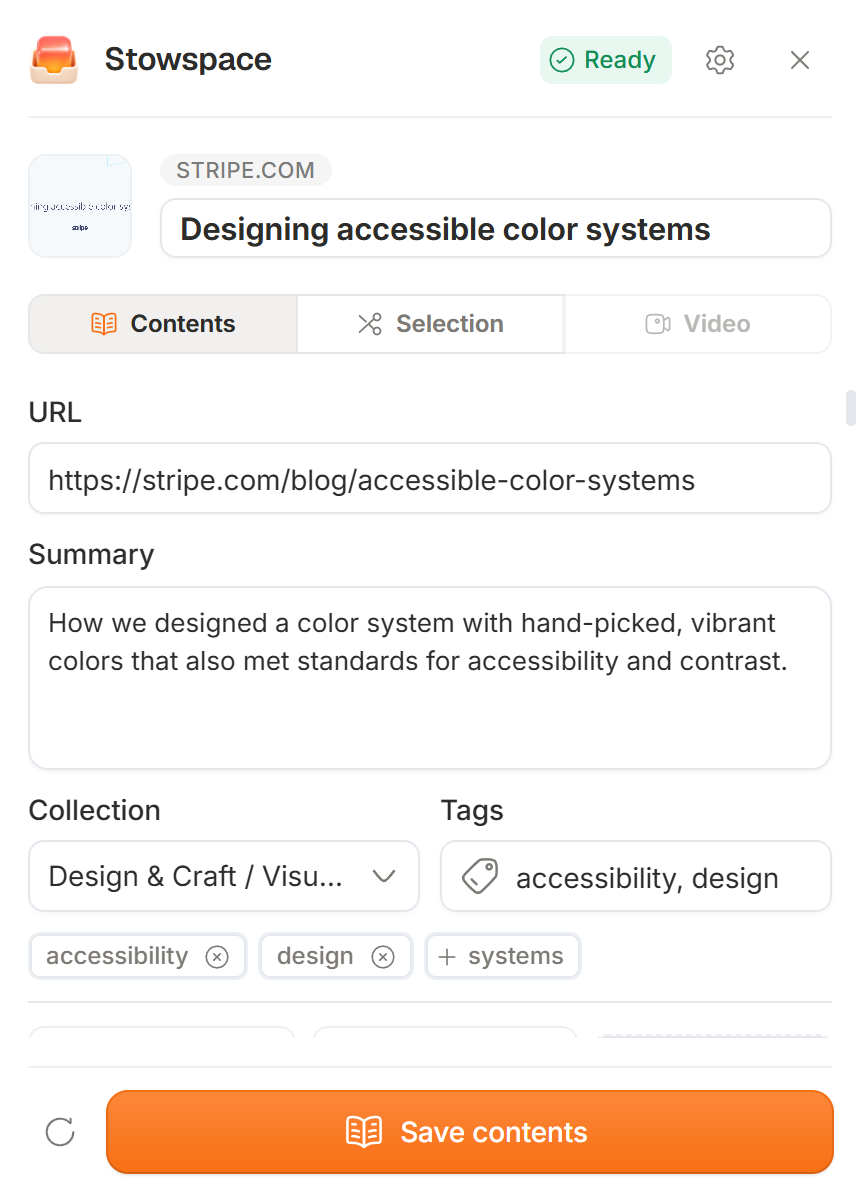
- Open the extension popup to save the current readable page and optionally choose tags or collections.
- Use the page context menu to save page contents.
- Select text, right-click it, and choose the Stowspace action to save a snippet.
- Supported video pages are saved as video items.
When desktop is unavailable
If the extension cannot reach the background service, it stores the capture in a bounded local extension queue. It retries in the background and also lets you retry from the popup. Keep the extension installed and start Stowspace or its background service so the queued saves can finish.
The queue is a short bridge-outage safety net, not a cloud archive. If it fills, open Stowspace and retry before making more saves.
Extension cannot reach desktop
Confirm that Stowspace is installed, then start the desktop app once. In desktop settings, check the extension bridge status. If the connection still fails, reinstalling the desktop app restores the Chrome and Edge native-messaging registration.
More help: Troubleshooting.
Follow the guide
Before you start
- The Stowspace Windows app and local background service already installed.
- A current Chrome, Edge, or Firefox release on the same Windows computer.
- Permission to save the page or selected material you are capturing.
Steps
- Install the approved Chrome Web Store or Microsoft Edge Add-ons listing when its button is available.
- Pin the extension, open a page, and choose article, selection, link, snapshot, or supported video capture.
- Review the title, collection, and tags, then send the capture to the local Stowspace app.
- Open the Windows library and confirm the new item appears with the expected capture type.
Expected outcome
A deliberate browser action sends only the requested material through the local bridge and creates a searchable item in the Windows library.
Common errors
- The extension says the desktop app is unavailable
- Start Stowspace once and confirm its background service is installed. Reinstalling the extension alone does not repair a missing local bridge.
- A signed-in page saves incomplete text
- Use selected-text or explicit signed-in-page capture. Restricted pages may not provide the same readable structure as public articles.